
hi, everyone from the core shed to the ROM pad
Ask your schedule. Out loud.
Pip is the brain for your mine design and scheduling software. It reads the live schedule on your PC and answers on your phone, with the figures on cards. It finds stopes in CAD, drafts drill designs, and proposes changes that only happen after you say yes.
- Works with your mine design software
- Runs on your own PC
- Your own Claude sign-in
- You confirm every change
say hi! beta!FREE FOR NOW
- 5-1 mucking: 695 → 1,390 t/dthe scheduler moves the finish from 24 to 19 Oct
(made-up numbers, real buttons)
what Pip does
The schedule, the CAD and the drill design, a question away
Pip works on the schedule you already have open in your design software. Ask the way you'd ask the planner at the next desk.
Ask the live schedule
Week totals, stopes, rates and fleet, read from the schedule as it is right now. Pip answers out loud with the figures on cards.
Ask →Change it, with a yes
Pip proposes rate and quantity changes, lists every edit, and applies them only after you tap Apply and Yes.
Confirm →See stopes in CAD
"Where is stope 10?" Pip selects it in CAD, zooms in and sends a highlighted picture to your phone.
Show →Draft drill designs
Rings, boxhole and rise, and brow cables for one stope in about ten seconds, with checks, a preview and a 3D view.
Design →new · Pip inside your CAD
Pip, standing right on your CAD window
A small add-in puts Pip on top of your design software on the PC. Drag it anywhere, click it, and ask. Selections, zooms and layer changes happen on the screen in front of you while you talk.
- Every command your design software's connector offers, found live: layers, entities and attributes, drawing, block model interrogation, scheduler set-up, the leveller, exports. New commands show up by themselves.
- Looking and reading run at once. Anything that changes CAD or the schedule is spelled out first and waits for your yes, and every change is logged.
- The same Pip, chats and skills as on your phone, headset and glasses.
(made-up mine, real add-in)
not just underground
For the whole mine, from the first drillhole to the last tonne
Pip's first skills grew up in an underground mine schedule. Pip itself isn't tied to one department: give it the right skills and data, and it helps everyone along the life of the mine.
-
Exploration
Drillhole planning and the drilling programme: what's next, and what came back today.
With skills -
Geology & resources
Grades, domains and the block model, by voice. The block model already shows in Pip VR.
With skills -
Mine planning
The live schedule, rate changes with a yes, stope drill designs, and MineJue, Pip's own design CAD: stopes, development, decline and a levelled schedule.
Live today -
Surface & operations
Pits, haul roads, stockpiles and the ROM pad, and who's on shift.
With skills -
Production
Planned against actual, by stope, shift and week, and what to do about the gap.
With skills
new · preview
Pip's own mine design CAD
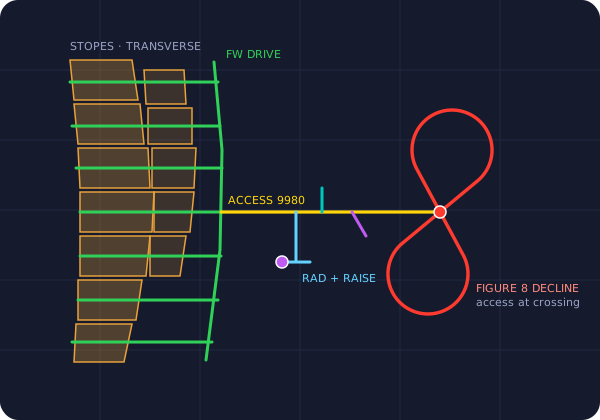
From a block model to stopes, level development, a decline, a ventilation check and a levelled life-of-mine schedule, in seven steps on your PC. Pip is built in, so you can redesign by asking.
- Stopes optimised lode by lode, along each lode's own strike and dip.
- Longitudinal or transverse ore access, raises that stack, declines that meet every access square.
- Open pit shells and an underground plan below the crown pillar.
wherever you are
One Pip, on every screen you've got
At your desk, on the phone in the crib room, in a headset with the whole mine on the table. Every device talks to the same Pip on your PC and picks up the same chats.
iPhone TestFlight beta
The Pip AI app: hold to talk, read the cards, confirm changes and turn drill designs in 3D.
Android phone Beta
The same Pip on Android, with the phone's own speech recognition and voice.
Inside your CAD New
Pip stands on top of your CAD window on the PC: drag it anywhere, click it to chat, and watch it work in CAD. Or open Pip in a browser. More →
Meta Quest 3 Preview
The scheduled mine at table scale in mixed reality. Point at a stope, ask Pip. More →
Even G2 smart glasses Prototype
The week's figures and Pip's best plan options in the lens. Long-press to preview a change, long-press again to confirm.
And more On the way
Every screen talks to the one Pip server on your PC, so new ones are easy to add. A little desk terminal is next.
safe by design
Nothing changes until you say yes
Pip reads freely and writes carefully. Every change is a proposal first, and every applied value is read back from the schedule.
Ask
"Double the boggers on stope 5-1 next week."
Review the proposal
Pip lists each rate or quantity edit on named tasks, with what the scheduler will recalculate.
Apply… then Yes
Two taps, on purpose. Dismiss and nothing is touched.
Read back, then save
Pip checks every value in the schedule. Save it to keep the change, or close without saving to undo.
new · Pip VR for Meta Quest 3
Walk through the schedule
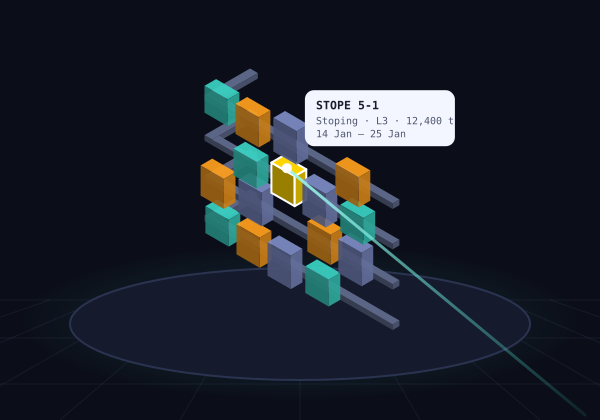
Put on a Quest 3 and the whole scheduled mine stands on your desk in mixed reality. Point at a stope, ask Pip about it, and step inside a drill design at life size.
- Task solids in their real shape, coloured by activity or start date, with a timeline.
- The block model inside the mine, and an exploded view of the levels.
- Select stopes with your hands and ask Pip about them out loud.
coming soon
The Pip Skill Market
Skills developed by mining experts in every department, uploaded once and downloaded by teams anywhere. Each skill you add unlocks a new job for Pip, from exploration to production.
- Experts publish what they know: the design rules, the checks and the drawing.
- Geologists, engineers and planners add a skill, and Pip can do that job by voice, on the phone or in VR.
- Versions and change history on every skill, and private skills for your company's standards.
how it runs
On your PC, next to your design software
A small Pip server runs on your own Windows PC beside your design software. Your phone, headset or glasses reach it over your private Tailscale network.
- Schedule figures go to Claude through your own Claude sign-in, as part of the conversation.
- Nothing is sent to the Pip developer.
- Chats and screenshots are saved on your PC, not in someone else's cloud.
Your phone, headset or glasses
- Pip appiPhone, Android, Quest 3, Even G2
Your Windows PC
- Pip serverNode.js
- Claude Codeyour sign-in
- Pip connectorto your software
- Design softwareCAD + scheduler
it gets dark down here
Meet Pip, the plug-tailed ore critter
A pocket-sized rock sprite with a miner's helmet, a headlamp, a plug for a tail and a little block-model cube. Pip's mood tells you what it's up to.
Ready when you are.
you've reached the ore body
Try Pip on your schedule
Pip is in beta with mine planners now, and growing into the rest of the mine. Tell us about your site and your team, and we'll be in touch.