
Pip VR · Meta Quest 3 · preview
The whole mine, on your table.
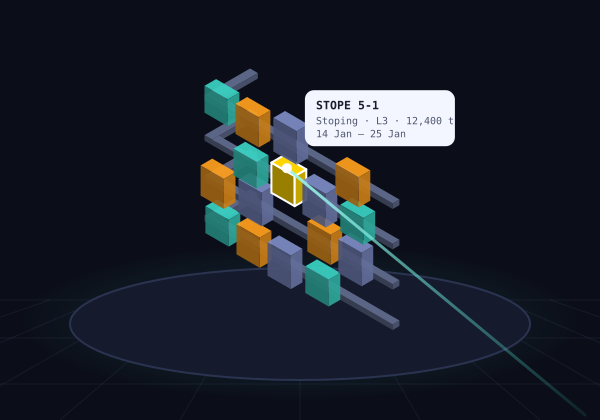
Put on a Quest 3 and the schedule's task solids stand on the desk in front of you, in mixed reality. Point at a stope to see its tonnes and dates, ask Pip about it out loud, and walk into a drill design at life size.
- Same Pip server on your PC
- Hands or controllers
- Changes still need your yes
Illustration
what Pip VR does
See the schedule as a place, not a Gantt chart
Pip VR reads the same live schedule and CAD as the phone app, through the same Pip server on your PC.
The mine at table scale
Every scheduled task solid in its real shape, coloured by activity or by start date. Filter by level, and drag the timeline to see the mine as scheduled up to any date.
Point, select, ask
Point at a solid for its name, level, tonnes and dates; pinch to select. Your next question to Pip carries the selection: "when do these start?", "design the drilling for this one".
The block model inside
The block model loaded in CAD, drawn as cubes in the mine's frame and coloured by grade, domain or resource class, with a cut-off slider. Point at a block for its grade and density.
Exploded view
Pull the levels or activity types apart, up, sideways or outwards, to see inside a crowded mine. Selecting still works while exploded; Assemble puts it back. CAD isn't touched.
Drill designs, life size
Pip's stope drill designs in mixed reality: holes coloured by firing, boxholes, brow cables and ring labels. Point at a hole for its ID and length, or go 1:1 and stand inside the stope.
Hands or controllers
Pinch and drag to turn the model like a globe, hold to move it, pull two hands apart to resize. A flick sets it spinning. Controllers work the same way.
Talk to Pip in the headset
Hold a button and speak, or type on the Quest keyboard. Pip answers out loud, and new drill designs appear on the table straight away.
Confirmed changes
Schedule changes Pip proposes appear as cards with Apply. Press twice, and the server writes and reads back every value, just as on the phone.
Your room, or Pip's
Work in your own room with passthrough, dim it, or switch to a night sky or underground rock. Pip's own music, or yours from the PC, quietens while Pip talks.
Pip comes along
Pip in 3D, on your floor
The ore critter wanders the floor in front of you. It shows a thought bubble while it works, raises a hand while you talk, waves while it answers, and jumps for a good answer.
Pick Pip up and put it on the table, and it wanders about up there instead. Poke it if you like; it doesn't mind.
how it connects
The same Pip, a bigger screen
Pip VR is a native Meta Quest 3 app that talks to the Pip server on your PC, like the phone does.
- Over Tailscale on the Quest, or through Quest Link on the PC.
- Schedule, CAD and block model are read through the Pip connector on your PC; CAD is never changed by the view.
- Schedule changes still need your confirmation, and are read back.
Pip VR is in preview. During early access we help you install it on your headset; ask if you'd like to try it.
Meta Quest 3
- Pip VRMixed reality, hands or controllers
Your Windows PC
- Pip serverNode.js
- Claude Codeyour sign-in
- Pip connectorto your software
- Design softwareCAD + scheduler
headset on?
Want to walk through your mine?
Pip VR is in preview with a few planners. Tell us about your site and your headset.